Every rep can check their own commission.
Sales commission software for any team size. Open any figure to see the deal, the split, the rate and the arithmetic behind it.
Then $149 a month, flat, for any number of payees.
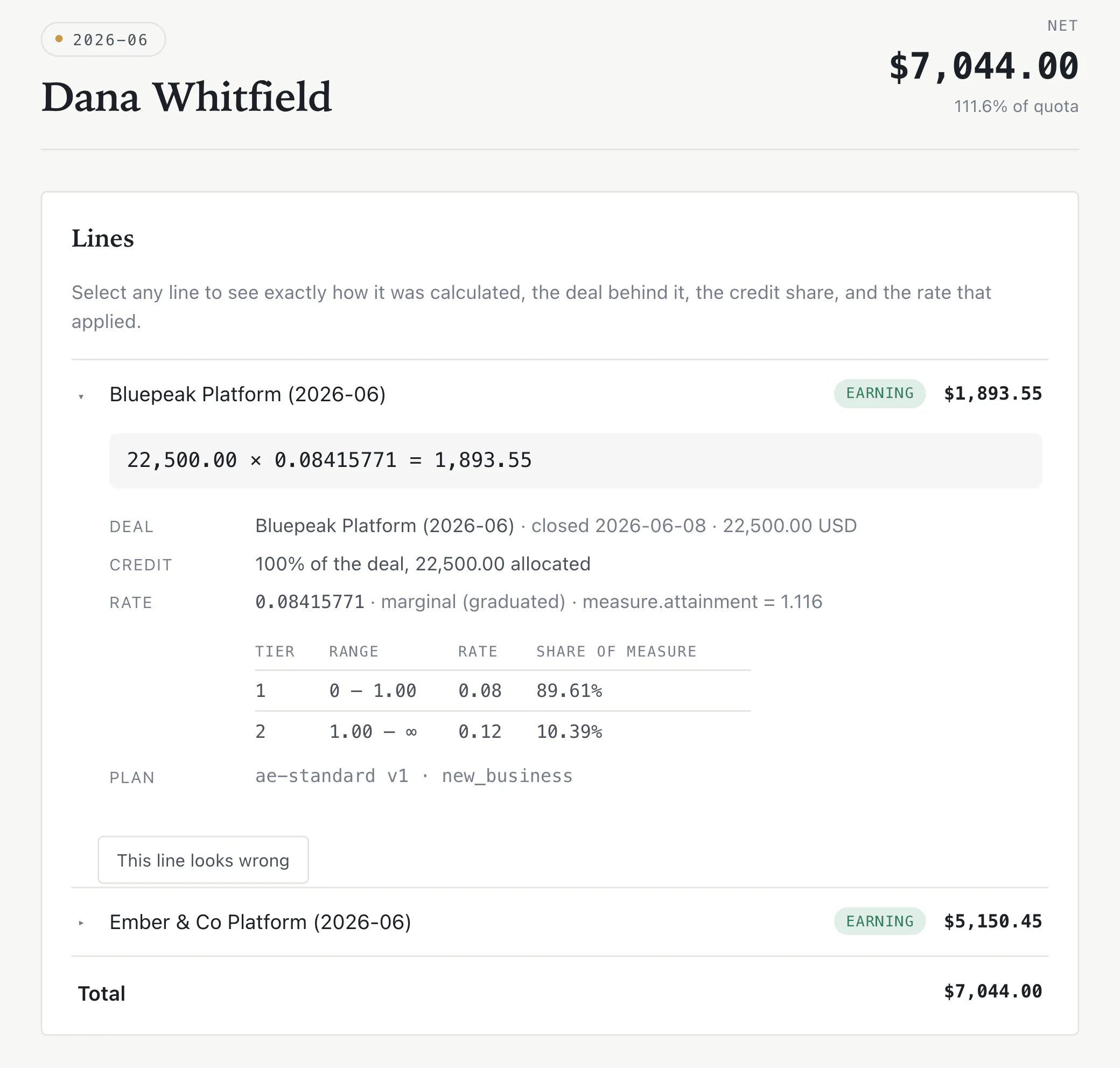
What a rep sees when they tap a line on their statement.
22,500.00 × 0.08415771 = 1,893.55
- Deal
- Bluepeak Platform · closed 2026-06-08 · 22,500.00 USD
- Credit
- 100% of the deal: 22,500.00 allocated
- Rate
- 0.08415771 · marginal (graduated) · attainment 1.11689.61% of the measure at 8%, 10.39% at 12%
That is the actual output, not a mock-up.
No setup feeor annual contract
Unlimited repsno minimum or maximum
30 daysfree to try
CSV inpayroll file out
Import, calculate, approve, export.
The same loop you already run in a spreadsheet, with a memory, a checklist, and a statement each rep can read.
- 01
Model the plan
Start from a template or write the components, rates, tiers, draws and clawbacks yourself. Live validation tells you what will not compile, before anyone is paid on it.
- 02
Import the month
Upload the CSV your CRM already exports. Column mapping is remembered, so next month is two clicks. If a row is wrong, nothing is imported and you get the file back with the problems marked.
- 03
Review the working
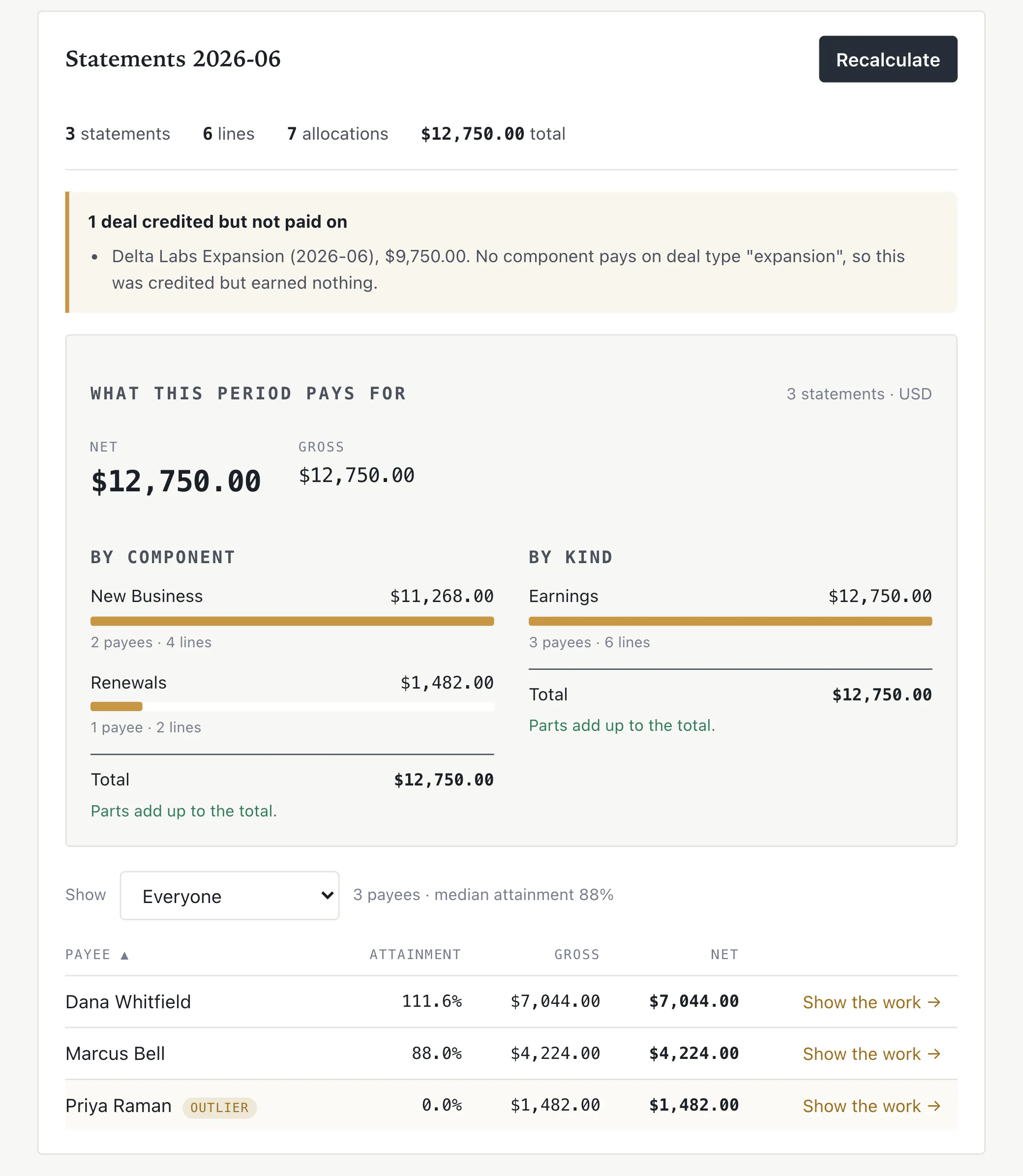
Every statement opens. The breakdowns have to reconcile to the total. A deal nobody was credited for, or credited but paid nothing, is named rather than dropped.
- 04
Approve, tell people, export
A checklist, then the period is frozen. Reps are emailed a statement they can open without an account. Payroll gets a file. We never move the money.
The parts a spreadsheet cannot keep straight.
Plans you can actually model
Graduated and cliff accelerators, splits, draws and clawbacks, per-product rates, caps, SPIFFs and guarantees. Thirteen starting templates, each with a worked example you can check by hand.
Start from a spreadsheet
Upload the CSV your CRM already exports. Column mapping is remembered, so next month is two clicks. If a row is wrong, nothing is imported and you get the file back with the problems marked.
Approve once, then it is frozen
A checklist before you commit, and after that the period cannot be edited. Corrections become adjustments in the next period, so last month’s statement stays true.
Export, never transfer
Approved periods export to Gusto, Rippling, ADP, Paychex, a journal entry, or plain CSV. We do not move money and never will. That is your payroll system’s job.
The software making the claim, not a drawing of it.
Between the spreadsheet and a $30,000 tool.
The enterprise products solve this properly, at a price and an implementation that make sense for a 500-rep company. This is for the twenty-rep company they priced out.
| Spreadsheet | AlgoSplit | Enterprise tools | |
|---|---|---|---|
| Price | Free, until a month is wrong | $149 a month, any team size | Around $30,000 a year |
| To get running | You already did | A CSV and a plan | Months of implementation |
| A disputed number | An email thread | The line opens; the rep can query it | A ticket, usually |
| A correction | Edit last month | An adjustment in the next period | Varies, and often rewrites history |
| Payroll | Copy and paste | An export. We never move money. | Often a payment product too |
Thirteen plans the product would actually create.
Each one has a worked example you can check by hand. They are generated from the same array the editor offers, so the documentation cannot drift from the software.
Tiered AE with renewals
Graduated tiers on quota attainment for new business, plus a flat rate on renewals.
A rep at 114% of a $5,000 monthly quota earns $484: 8% up to quota, 12% on the rest.
AE with accelerators
The most common SaaS structure: a base rate to quota, then accelerating rates above it.
A rep at 160% of a $100,000 quota earns $10,000 to quota, $7,500 from 100–150%, and $2,000 above: $19,500.
Quarterly cliff
Crossing a threshold re-rates the entire quarter, not just the excess.
A rep at 101% of a $300,000 quota earns 12% on all $303,000, $36,360. At 99% they earn 8%: $23,760.
Ramped new hire
Tiered commission with a recoverable draw for the first six months.
A new rep earning $2,000 against a $4,000 draw is topped up to $4,000; the $2,000 shortfall is recovered from later months.
CSM: retention and expansion
Renewals and expansion at different rates, with a clawback if the account churns quickly.
A $200,000 renewal pays $6,000, reversed if the customer churns within 120 days.
SDR: meetings and sourced revenue
A fixed amount per qualified meeting, plus a slice of anything sourced that closes.
20 meetings at $100 each is $2,000, plus 2% of $200,000 sourced and won.
One price. No implementation fee.
Free for the first 30 days: a whole close, before you pay for one. Then $149 a month for the whole workspace. Not per payee, not per seat, not per admin. Five reps or fifty, the invoice is the same, so growing the team is never a conversation with us.
- Plans, quotas, credit rules and assignments
- CSV, JSON and Excel import, with the mapping remembered
- Calculate, review, approve, and a period that stays frozen
- Statements that show the working, emailed, as PDF
- Payroll export to Gusto, Rippling, ADP, Paychex, or CSV
- Queries raised from the statement itself
$149 a month
No minimum and no cap. Five payees or five hundred, the price is the same, and every admin, every feature and every export is in it.
- 5 payees
- $149
- 25 payees
- $149
- 50 payees
- $149
Nothing is charged today. The first invoice comes at the end of the first month. Questions before you start? Contact us.
Built so a forgotten WHERE cannot leak a workspace.
- Tenant isolation is structural. Every query is issued through a helper that asserts a workspace predicate at runtime. The raw database method is banned outside that layer by lint.
- No third-party tags. No analytics vendor, tag manager, or advertising pixel. The content security policy forbids them.
- We never hold funds. The deliverable is a payroll export. There is no bank connection and no payment credential in the product.
See it against your own plan
Send us how you actually pay people, the tiers, the splits, the draws, whatever the spreadsheet is holding together. We will tell you plainly whether it models, and show you your own numbers running through it. If it does not fit, we would rather say so.